 Crypto to Cash App
Turn your crypto into Cash App dollars.
To get crypto into Cash App, pick Cash App as your payout, enter your $Cashtag or the phone number linked to it, and send your coins to the address on your order page. Once the coins confirm, we pay US dollars to your Cash App, usually within minutes. The fee is 1.5%, orders run from $100 to $2,500, and it works for coins Cash App cannot take, such as USDT.
- Zilligo fee, 1.5%
- $7.50
- Network fee
- Paid by your wallet
- Usually arrives
- Minutes
An estimate at today's price. Your order page fixes the exact amount for 20 minutes.
- Fee, inside your quote
- 1.5%
- After your coins confirm
- Minutes
- Per order
- $100 to $2.5k
- You need
- $Cashtag
The coin question
Which coins Cash App takes, and which it does not
Cash App accepts Bitcoin, and since May 2026 it also takes USDC on Solana, Ethereum, Polygon and Arbitrum, which it turns into dollars. If that is what you hold, you can send it in yourself.
Everything else has no door. USDT, ETH, SOL, XRP, BNB and Monero cannot be deposited into Cash App at all. The usual workaround is an exchange account, a sale, a bank withdrawal and then a transfer into Cash App, which takes days.
We shorten that to one order. You send the coin you already have, we send dollars to your $Cashtag the same way a friend would pay you, and the money sits in your balance like any other payment. We never need your Cash App PIN or sign-in code.
 Zilligo pays in dollarsYour Cash App balance
Sending it yourself
Cash App takes Bitcoin and USDC. What about the rest?
Sending Bitcoin or USDC straight to Cash App is a fair choice if that is what you hold. For any other coin, Cash App has no address to send to.
Depositing into Cash App yourself
- No way in for USDT, ETH, SOL, XRP, BNB or Monero
- USDC is not offered to New York residents
- Selling bitcoin in the app has its own Cash App fee
- Simple if your coins are already Bitcoin or USDC
 Zilligo to Cash App
- Seven coins, USDT on Tron included
- Paid to your $Cashtag or linked phone number
- One 1.5% fee, inside the quote you see first
- Your rate is held for 20 minutes while you send
Step by step
How to send crypto to Cash App
Three steps after a free account, set up in a minute. You never connect Cash App to anything.
- 1Pay out toCash App$rosa_m88You get$300.00
Enter your $Cashtag and amount
Say how many dollars you want in Cash App and type your $Cashtag. The quote shows the coin amount to send and the dollars you get.
- 2
 304.50 USDTTQx7...9fKpW2Rate locked 14:32
Send from any wallet
Your order page gives one fresh address, the network and the exact amount. The quote stays fixed for 20 minutes while you send.
- 3Cash AppnowYou received $300.00From Zilligo
Cash App shows the payment
When your coins confirm, we pay your $Cashtag. It appears in your balance with the usual Cash App notification.
Checklist
What to have ready
A US Cash App account
One that can receive payments in dollars.
Your $Cashtag
It starts with $ and sits on your Cash App profile. The linked phone number works too.
Coins in any wallet
USDT, BTC, ETH, SOL, XRP, BNB or XMR, on a wallet or an exchange.
A verified Cash App above $1,000
Unverified accounts can receive about $1,000 in a rolling 30 days.
Once it lands
Where your Cash App dollars can go
Pay someone back
Send part of it to a friend's $Cashtag in a few taps.
Move it to your bank
Standard transfers are free and take 1 to 3 business days.
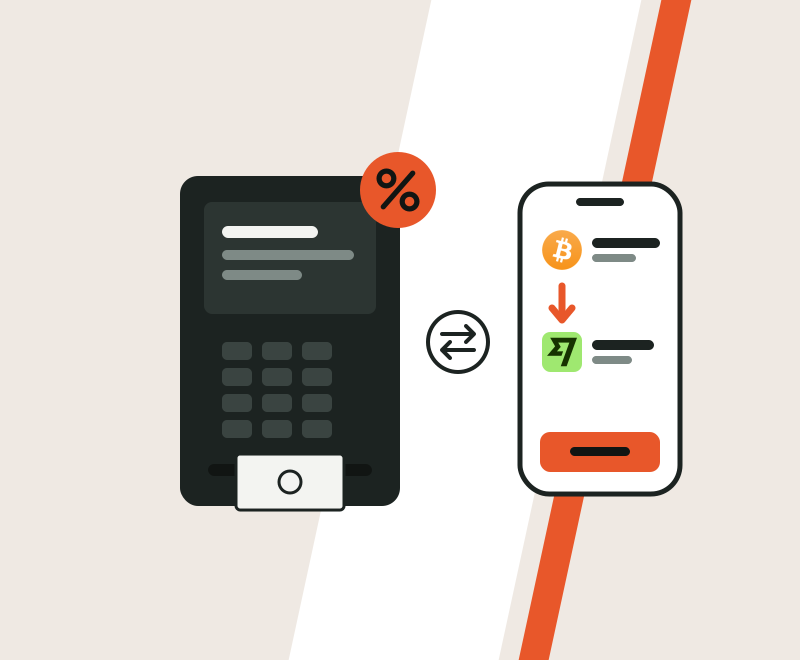
Price and speed
1.5%, and minutes once your coins confirm
One fee, shown in your quote with nothing hidden in the rate. The coin you pick sets most of the wait.
Example
Your coin's network cost comes on top: a fraction of a cent on Solana or XRP, about $2 to $4 for USDT on Tron.
Our pick for Cash App: USDT on Tron. Cash App has no way to receive it, it keeps a steady dollar value while it confirms, and sending it usually costs about $2 to $4.
USDTBest pickNetworkTRC-20 (Tron)Usually arrives1 to 3 minNetwork costVery lowCash App takes itNo BitcoinNetworkBitcoinUsually arrives10 to 30 minNetwork costVariesCash App takes itYes
 SolanaNetworkSolanaUsually arrivesUnder 1 minNetwork costVery lowCash App takes itNoUSDTNetworkERC-20 (Ethereum)Usually arrives2 to 5 minNetwork costHigherCash App takes itNo
 EthereumNetworkEthereumUsually arrives1 to 5 minNetwork costVariesCash App takes itNo
 XRPNetworkXRP LedgerUsually arrivesUnder 1 minNetwork costVery lowCash App takes itNo
 BNBNetworkBNB Smart ChainUsually arrivesAbout 1 minNetwork costLowCash App takes itNo
 MoneroNetworkMoneroUsually arrivesAbout 20 minNetwork costLowCash App takes itNo
How long each coin takes to confirm. The last column shows what Cash App accepts by itself.
Cash App's side
Cash App limits to check first
Cash App caps what an unverified account can receive. That cap is often lower than our order limit, so look at it before you place a big order.
Cash App sets these numbers and can change them. Your own limits are in the Limits section of your Cash App settings.
- Unverified Cash App
- About $1,000 received per rolling 30 days
- Verified Cash App
- Higher limits, shown in the app
- Zilligo per order
- $100 to $2,500
- Standard transfer to your bank
- Free, 1 to 3 business days
- Faster transfer to your bank
- 0.5% to 1.75%, at least $0.25
Cash App and Zilligo limitsAvoid delays
Five checks before you send
- 1
Copy your $Cashtag from your profile
Keep the $ and check each letter. A different $Cashtag pays a different person.
- 2
Look at your Cash App limits
If your account is not verified, an order above about $1,000 can get stuck on Cash App's side.
- 3
Match the coin, network and amount
Send exactly what your order page shows. A coin on the wrong network may not reach us.
- 4
Mind the 20 minutes
Send within the rate hold, so the quote you saw is the quote you get.
- 5
Keep your order reference
Support finds your payout fastest with it, and it is your record for tax.
Troubleshooting
When a Cash App payout needs a hand
I entered the wrong $Cashtag
Contact support right away with your order reference. If the payout has not gone out, we can change it.
Cash App says I reached a limit
Verify your identity in Cash App to raise the limit, then send support your order reference so we can complete the payout.
The payment is pending in Cash App
Cash App sometimes reviews a new incoming payment. Your order page shows our side, and the review is handled inside Cash App.
I sent the wrong coin or network
Send support your order reference and the transaction ID. We check what reached us and explain what can be done.
Side by side
Three ways to get crypto into Cash App
Paying through us, depositing Bitcoin or USDC yourself, or selling on an exchange first.
How do I cash out crypto to Cash App?
Choose Cash App, enter your $Cashtag and the dollars you want, and send the coins your order page shows. When they confirm, we pay your Cash App balance.
Can I send USDT to Cash App?
Not to Cash App itself. It takes Bitcoin and USDC, not USDT. Send your USDT to your Zilligo order instead, and we pay the dollar value to your $Cashtag.
Can I send Bitcoin to Cash App?
Yes, Cash App has its own bitcoin address. Go through us instead if you want US dollars in your balance rather than bitcoin, or if your Bitcoin is on an exchange that cannot send to Cash App.
Does Cash App accept Ethereum or Solana?
Not as coins. Cash App takes USDC on the Ethereum and Solana networks, but not ETH or SOL themselves. With us you can pay in either, and the dollars land in Cash App.
How long does crypto to Cash App take?
The payout usually goes out within minutes of your coins confirming. Tron, Solana and XRP confirm in about a minute; Bitcoin usually takes 10 to 30 minutes.
How much does it cost?
Our fee is 1.5%, already in your quote, plus the normal network cost of your coin. On $300 that is $4.50 to us. Cash App's own fees, such as for faster bank transfers, are separate.
What is the most I can cash out to Cash App?
$2,500 per order, from a minimum of $100. Your Cash App may have a lower receiving limit if it is not verified.
Can I use my phone number instead of a $Cashtag?
Yes. Enter the phone number linked to your Cash App. A $Cashtag is the most exact, so we suggest it when you have one.
Do I need a Zilligo account?
Yes, a free one that takes about a minute. After that you only give your $Cashtag. There is no ID check to start a cashout.
Will you ask for my Cash App PIN?
Never. A $Cashtag is enough to pay you. Anyone asking for your PIN or sign-in code is not us.
Does it work outside the US?
No. Cash App payouts go to US accounts in dollars. Elsewhere, PayPal or Wise usually suit better.
Do I pay tax on a Cash App cashout?
Turning crypto into dollars usually counts as selling it, which can be taxable. This is general information, not tax advice: keep your order reference, date and amount for your records.
Other US payouts
 Venmo
 Chime
 PayPal
 ACH Transfer
Countries where it leads
Ready when you are
Your $Cashtag is all we need
Pick a coin, send it, and get dollars in Cash App. The exact amount is on screen before you pay.
Orders from $50 on gift cards and top-ups, $100 on most payouts. Nothing moves until you send.
- 1Pick a payoutBank transfer, PayPal and other wallets, a card, a gift card or cash pickup.
- 2Send your coinsTo the one-time address on your order, before the 20 minute timer runs out.
- 3Get paidMost payouts arrive within minutes of your coins confirming.